前端 - 那些你不知道的炫酷导航交互效果_个人文章 - SegmentFault 思否
基于上次发布的 那些你不知道的炫酷按钮交互效果 反馈比较好,后续将继续收集那些炫酷的交互效果,希望可以给你的项目添砖加瓦,更上一层楼。那些你不知道的炫酷交互效果系列:那些你不知道的炫酷按钮交互效果那些
顺晟科技
2022-09-13 14:33:23
136
最近在写微信小程序,然后之前网页也写过css动画实现,就记一下
第一种实现方法是通过transition
view
{
width:100px;

/*transition: property duration timing-function delay;*/
transition: width 2s;

-moz-transition: width 2s; /* Firefox 4 */
-webkit-transition: width 2s; /* Safari 和 Chrome */
-o-transition: width 2s; /* Opera */
}

view:hover
{
width:300px;
}
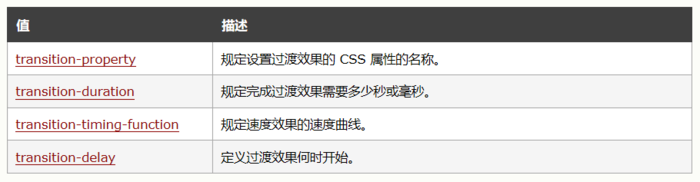
PS:当多个属性一起变化可以将property的值设为all
transition的效果是需要伪类选择器来触发的,不能自动播放,所以CSS还有animation属性来设置动画。
第二种实现动画效果的方法就是靠animation属性来实现
@keyframes animations{
    0% {
        ...
    }

    ...

   100% {
        ...
    }

}

.animation{
    /*animation: name duration timing-function delay iteration-count direction;*/
   /*详情参见http://www.w3school.com.cn/cs-s-ref/pr_animation.asp*/

    animation: animations 3s liner;
}
这种方法可以实现很复杂的效果,像背景图片自动轮播(用infinite配合delay)什么的。
但是写起来比较复杂,而且没有办法根据事件触发(纯css无法实现),所以小程序推出了wx.creatAnimation()的API。
第二张方法就是依靠微信小程序提供的API来实现。
wx.createAnimation(Object object)
首先需要在wxml中设置好animation
<view animation=\'{{animationdata}}\'></view>
然后在js里设置好动画数据
Page({
  data:{
    animationdata:{}
  },

  ...

})
最后通过调用API实现动画
var animation = wx.createAnimation({
      duration: 2000,
      timingFunction: \'ease\',
      delay: 3000
    })
animation.translate(0, -height*3/10)
.opacity(0.7)
.step()
this.setData({
animationData: animation.export()
})
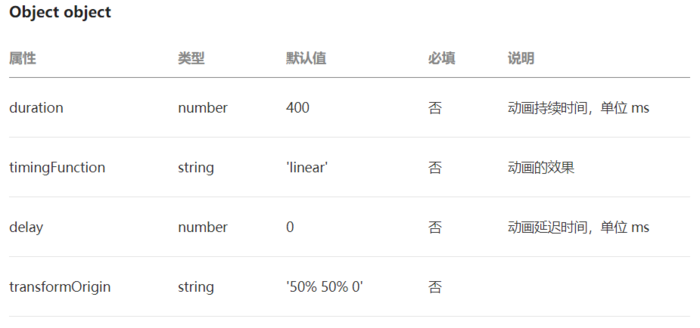
详见小程序官方文档https://developers.weixin.qq.com/miniprogram/dev/api/ui/animation/wx.createAnimation.html
其实没什么好说的,小程序把繁琐的css封装成API了,这样的好处就是很方便,但是缺点就是实现复杂效果比较麻烦。。。
值得一提的是animation.step(),同一step的动画会同时执行
animation.translate(0, -height*3/10)
              .opacity(0.7)
              .step()       //以上为同一步执行的的动画
              .opacity(1)
              .step()       //此为下一步的动画

//不同步骤的动画如果不加入参数是默认根据wx.creatAnimation(object)里的参数来的
animation.step()

最后说一下this.setdata里的animation.export()
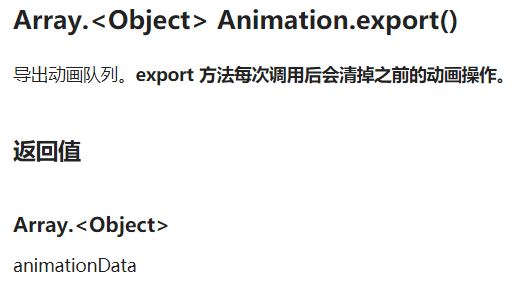
其实微信小程序的官方文档里讲解的很清楚了,特别是https://developers.weixin.qq.com/miniprogram/dev/api/ui/animation/Animation.html里的示例代码,看一下就明白了。
差不多就这样。。。其实还有通过JavaScript实现动画效果的,那个我还没摸索过,只能写点自己比较了解的。
31
2022-10
22
2022-10
19
2022-10
19
2022-10
19
2022-10
19
2022-10